Table of contents
Introduction
Starting with version 1.25, you can integrate Daily with other tools using a web API and platforms like Zapier. These platforms let you design integrations without writing any code, making automation accessible to everyone. Daily also provides an MCP server, allowing AI assistants and agents to access your timesheets and import activities.
Use cases
Tracking your time is often just the first step. What really matters is how you use that information. Here are some common ways to streamline your workflow using integrations:
Creating invoices: Send your billable hours directly to an invoicing system like FreshBooks or Zoho Invoice. This saves time, reduces errors, and eliminates the need for manual formatting in tools like Microsoft Excel or Google Sheets.
Reporting hours: Whether you need to report hours to a client, manager, or finance team, automatically submit your recorded hours to project management, issue tracking, or CRM systems such as Jira, Salesforce, Xero, ClickUp, or proprietary platforms.
Importing activities: If you already manage tasks in apps like Todoist, Asana, Trello, or Jira, retyping them into Daily feels redundant and error-prone. With an integration, you can automatically import your tasks so they appear in Daily, ready for you to select when asked what you’re working on.
Custom reporting and data visualization: Build dashboards, summaries, and visualize time spent by connecting your time data to tools like Airtable or Notion. Explore your hours conversationally using ChatGPT, or create visual insights with platforms like Claude Artifacts. With tools like Schedule by Zapier, you can automate reports and send them to yourself, your team, or your clients on a regular schedule.
Conversational time tracking analysis: Use Daily’s MCP server with AI assistants to ask questions about your recorded hours, such as how much time you spent on a client, project, or activity during a specific period.
AI-powered workflows and automation: Let AI agents and coding assistants retrieve time tracking data from Daily and use it as part of a larger task, such as preparing invoices, generating weekly reports, checking billable hours, or comparing activity across clients.
Exporting using custom formats: Daily’s standard export formats don’t always match what you or your tools need. If you’ve been cleaning up exports manually, you know how tedious and error-prone that can be. With tools like Zapier Formatter, you can automatically reshape the exported data into any format you like.
Setting up an integration
Enabling integrations
By default, integrations is turned off. To enable it, open Daily’s preferences by clicking the menu icon in the dashboard and selecting Preferences…. Then, check the box next to Integrations:
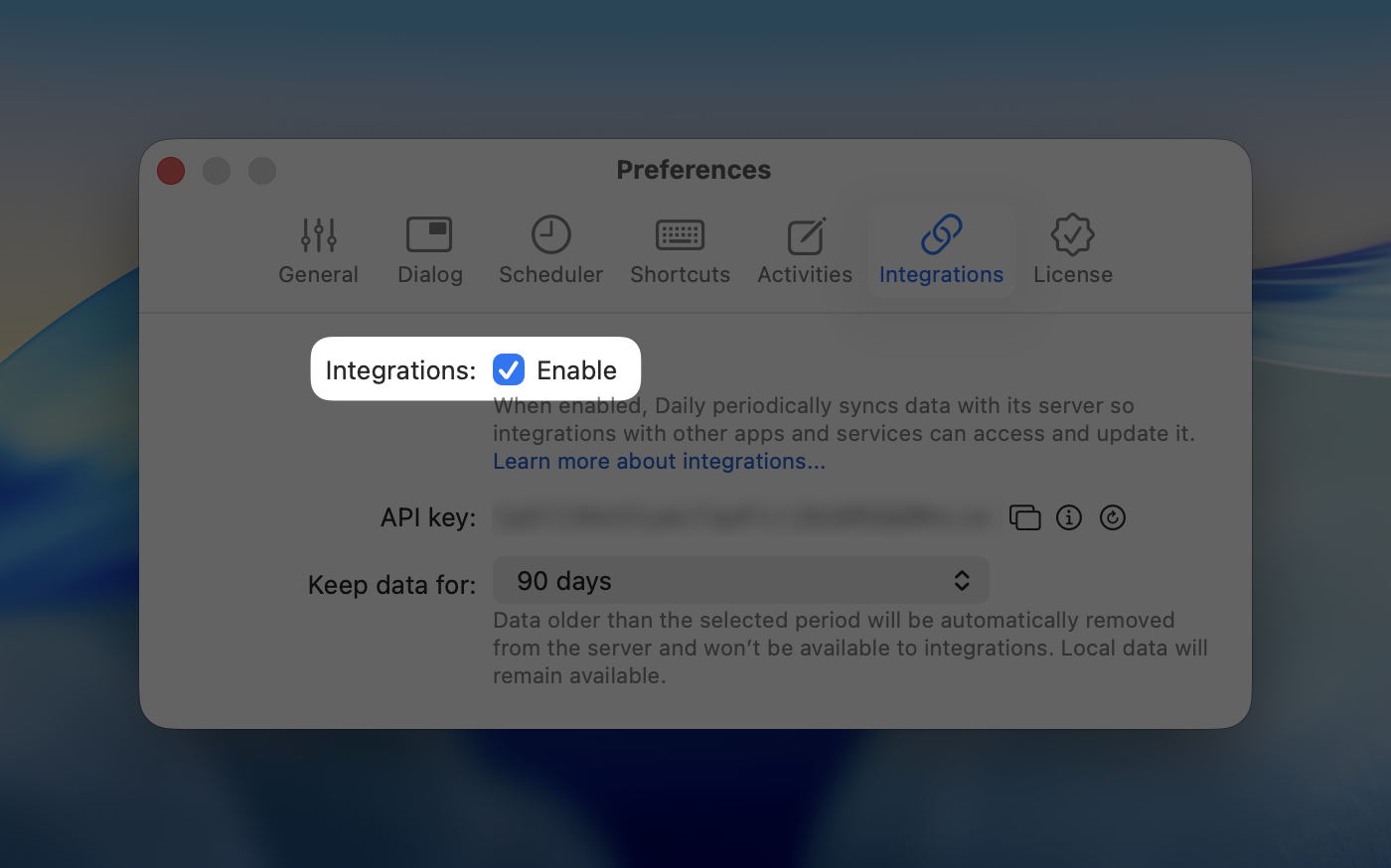
When enabled, Daily periodically syncs data with its server, but only if the data is newer than the Keep data for setting. When disabled, any data stored on the server will be deleted.
Authentication
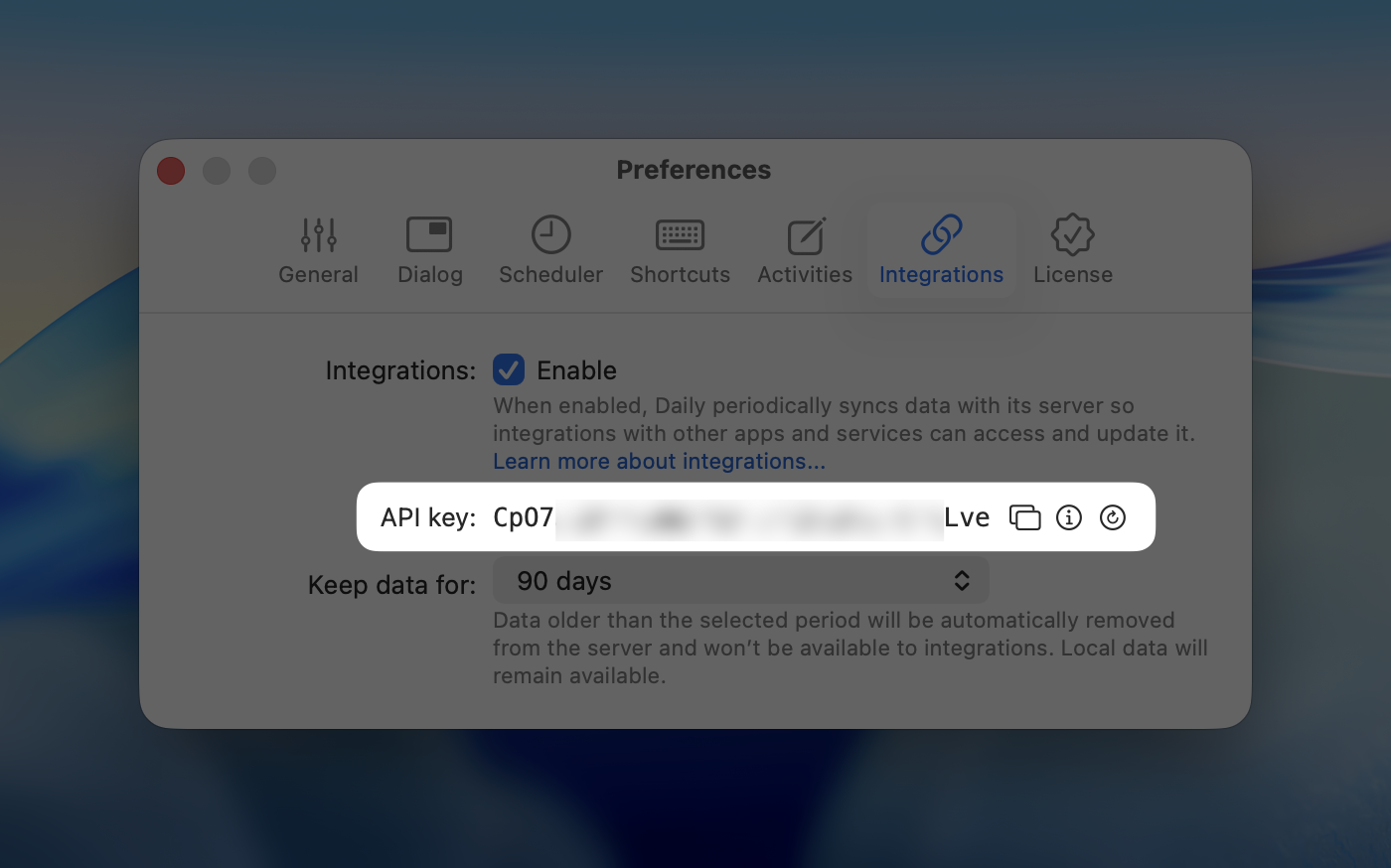
Other apps use an API key to identify you. It works like a combination of a username and password, but for systems. For this reason, it’s important to keep your API key secure and only share it with trusted apps that you want Daily to integrate with.
If you think your API key has been compromised, or if a company you’ve integrated with informs you of a security issue, regenerate the API key immediately. Then update the other app with the new API key to keep your integration working smoothly.
You can find your API key under the Integrations tab in Daily’s preferences:
Using the web API
You can access the web API via https://api.dailytimetracking.com. When making requests, be sure to include the following headers:
Content-Type: application/jsonAccept: application/jsonAPI-Key: <your API Key>
The web API may return the following response codes:
200 OK– The request was successful and returned a response body.204 No Content– The request was successful, but there is no content in the response.400 Bad Request– The request was invalid or missing required data.401 Unauthorized– The request failed due to an invalid or missing API key.500 Internal Server Error– The server encountered an unexpected error while processing the request.
Below, you'll find a list of available endpoints for interacting with Daily's data:
GET /user
Returns information about the user.
Response body (JSON)
A user object with the following properties:
dataRetention(integer): The number of days the server keeps the data of the user.lastSynced(string | null): The date and time of the most recent data synchronization, formatted according to ISO 8601. Ifnull, synchronization has not occurred yet.
Example response:
{

    "dataRetention": 90,

    "lastSynced": "2025-08-21T09:14:15+00:00"

}
GET /activities
Returns a list of activities, with optional filtering to exclude archived entries. Note that activities without any time entries stored on the server are not included by default. To include all activities, ensure that Daily is configured to retain data on its server indefinitely via the preferences.
Query parameters
includeArchivedActivities(optional) – When set tofalse, archived activities are excluded from the response. Defaults totrue.
Response body (JSON)
An array of activity objects with the following properties:
id(integer): The ID of the activity, used by Zapier to determine whether an activity is new. In the future, this ID can also be used to update an activity.name(string): The name of the activity.group(string | null): The group the activity belongs to. Ifnull, the activity is ungrouped.lastUsed(string | null): The date and time the activity was last used, formatted according to ISO 8601. Ifnull, the activity has never been used.archived(boolean): Indicates whether the activity is archived.
Example response:
[

    {

        "name": "A grouped activity",

        "group": "A group",

        "lastUsed": "2025-07-14T12:46:25+02:00",

        "archived": false

    },

    {

        "name": "An ungrouped and archived activity",

        "group": null,

        "lastUsed": "2025-07-14T11:32:59+02:00",

        "archived": true

    }

]
GET /summary
Returns a summary of time spent on activities within the specified date range, with optional filtering to exclude archived activities.
Query parameters
start(required) – The start date formatted according to ISO 8601.end(required) – The end date formatted according to ISO 8601.includeArchivedActivities(optional) – When set tofalse, archived activities are excluded from the response. Defaults totrue.
Response body (JSON)
An array of activity objects with the following properties:
activity(string): The name of the activity.group(string | null): The group the activity belongs to. Ifnull, the activity is ungrouped.duration(integer): The total time spent on this activity during the specified date range, in seconds.
Example response:
[

    {

        "activity": "A grouped activity",

        "group": "A group",

        "duration": 16147

    },

    {

        "activity": "An ungrouped activity",

        "group": null,

        "duration": 423

    }

]
GET /timesheet
Returns a list of calendar days within a specified date range, along with the activities recorded for each day (if any), with optional filtering to exclude archived activities.
Query parameters
start(required) – The start date formatted according to ISO 8601.end(required) – The end date formatted according to ISO 8601.includeArchivedActivities(optional) – When set tofalse, archived activities are excluded from the response. Defaults totrue.
Response body (JSON)
An array of day objects with the following properties:
date(string): The date of the day formatted according to ISO 8601.activities(array): A list of activity objects for that date. Empty if no activity was logged on that day. An activity has the following properties:activity(string): The name of the activity.group(string | null): The group the activity belongs to. Ifnull, the activity is ungrouped.duration(integer): The total time spent on this activity during the specified date range, in seconds.
Example response:
[

    {

        "date": "2025-07-14",

        "activities": [

            {

                "activity": "A grouped activity",

                "group": "A group",

                "duration": 843

            }

        ]

    },

    {

        "date": "2025-07-15",

        "activities": []

    }

]
POST /activities
Adds new activities (and optionally groups), and optionally archives existing activities.
Query parameters
archiveExistingActivities(optional) – Iftrue, all existing activities will be archived, unless they are part of the request body. Defaults tofalse.
Request body (JSON)
An array of activity objects. Each object must include a name (string) and may optionally include a group (string). If the group is omitted or set to null, the activity is treated as ungrouped.
If an activity with the same name already exists (within the specified group), it will be ignored. Existing time entries associated with that activity will remain unaffected.
Example request:
[

    {

        "name": "A grouped activity",

        "group": "A group"

    },

    {

        "name": "An ungrouped activity",

        "group": null

    }

]
Response body (JSON)
The response body contains a list of processed activities, including those that already existed and were not added, similar to the request body.
Using Zapier
Daily is available on Zapier, allowing users to connect it with thousands of other apps without writing any code. Automations (called Zaps) can be set up either by designing them directly or by using Zapier’s AI-powered chatbot to describe what you want.
Every Zap works with triggers and actions. A trigger is an event that starts a Zap, for example when an item is added or updated in Daily. An action is what happens after the trigger, such as creating or updating items in another app, transforming data, or sending an email.
Daily currently supports the following triggers and actions:
Triggers
New Activity: Triggers when a new activity is created.
New or Updated Time Entry: Triggers when time entries are created or updated.
Actions
Add Activity: Adds an activity to an optionally specified group.
Find Summary: Finds a summary that shows the total duration spent on each activity across all days.
Find Timesheet: Finds a timesheet that shows the total duration spent on each activity per day.
Using the MCP server
Daily provides an MCP server, allowing AI assistants and agents to interact with Daily. MCP (Model Context Protocol) is an open standard for connecting AI tools to external applications and services.
With Daily’s MCP server, you can ask questions about your recorded hours in AI assistants or let agents use your time tracking data as part of larger workflows. For example:
“How many hours did I work for Client X in February?”
“Show my timesheet for last week.”
“Create an invoice for Client X based on the hours I worked in February.”
The MCP server is built on top of Daily’s existing web API and exposes a focused set of tools for reading time tracking data, checking synchronization status, and importing activities.
Note: The current MCP implementation is intended primarily for technical users. It uses API key authentication instead of OAuth, which means not every MCP client can connect to it directly. Some clients may require an MCP proxy.
Daily's MCP server is accessible via https://mcp.dailytimetracking.com.
Authentication
The MCP server uses the same API key as Daily’s web API. Authentication is performed using the API-Key HTTP header. This keeps the MCP server consistent with Daily’s existing API. However, many remote MCP clients currently expect OAuth authentication and do not allow custom HTTP headers. As a result, some clients cannot connect directly to Daily’s MCP server. If your MCP client supports custom HTTP headers, simply configure it to send the API-Key header with every request. Otherwise, you can use an MCP proxy. An MCP proxy connects to Daily using your API key and re-exposes the same tools in a way your AI assistant or agent supports. One example is MCP Beast.
Available tools
Daily’s MCP server currently exposes the following tools:
get_user: Returns synchronization status, including data retention and the most recent sync time.
list_activities: Lists activities, including names, optional groups, last-used timestamps, and archive status.
get_summary: Returns an aggregated summary of tracked time for a specified date range, grouped by activity and group.
get_timesheet: Returns a day-by-day timesheet for a specified date range.
add_activities: Adds or imports activities, optionally assigning them to groups. Existing matching activities are ignored, and imported activities can optionally be synchronized by archiving those no longer present.
Instructions
Before configuring an MCP client, enable Integrations via Daily's preferences. This allows Daily to synchronize data with its server and provides the API key used by the MCP server. Then configure your preferred MCP client using the linked instructions and the provided notes.
ChatGPT: ChatGPT requires Developer mode to add MCP servers. At the moment, remote MCP servers only support no authentication and OAuth. Because Daily authenticates using the
API-KeyHTTP header, an MCP proxy such as MCP Beast is currently required.Codex: Codex supports remote MCP servers with custom HTTP headers, allowing it to connect directly to Daily without an MCP proxy. To avoid storing your API key in plain text, configure the
API-Keyheader using an environment variable.Claude: Claude supports adding remote MCP servers through Connectors. Remote connectors currently support OAuth authentication but do not allow configuring custom HTTP headers. Because Daily authenticates using the
API-KeyHTTP header, an MCP proxy such as MCP Beast is currently required.Claude Code: Claude Code supports remote MCP servers with custom HTTP headers, allowing it to connect directly to Daily’s MCP server without an MCP proxy. For improved security, configure the
API-Keyheader using an environment variable instead of storing it directly in the configuration.Cursor: Cursor supports remote MCP servers with custom HTTP headers, allowing it to connect directly to Daily’s MCP server without an MCP proxy. For improved security, configure the
API-Keyheader using an environment variable instead of hardcoding it in your MCP configuration.Gemini CLI: Gemini CLI supports remote MCP servers with custom HTTP headers, allowing it to connect directly to Daily’s MCP server without an MCP proxy. For improved security, configure the
API-Keyheader using an environment variable instead of storing it directly in the configuration.
Frequently asked questions
Can I use the web API as a team?
At the moment, API keys are linked to individual users. There’s no team-wide API key yet, but this feature is planned for later this year. Once available, it will allow your team to import activities and export data for all users within the same team. This functionality will be part of Daily’s Business Portal.
Do you support integrating with/via ...?
In general, Daily can integrate with any app that offers an API. The easiest way to set up an integration is by using Zapier, which lets you build automations without writing code. If the app you want Daily to connect with isn’t available on Zapier, your best option is to create a custom integration. You can use AI tools like ChatGPT to assist you, or work with a developer. If you’re unsure how to proceed, feel free to contact us.
Can you develop an integration for me?
We typically don’t develop custom integrations, as they’re often tailored to specific workflows. Our focus is on improving Daily for the broader user base. However, if a feature or integration is requested by a significant number of users, we may consider supporting it. Let us know what you need.
Can I also manage activities or add and manage time entries?
Currently, the web API supports importing activities and exporting time data. These features cover most of the common use cases described above. For more advanced control or interaction with Daily’s data, you can also use AppleScript.
We’re open to expanding the web API with additional capabilities. If you have specific needs or ideas, let us know.
How is my data protected?
By default, the web API is disabled. In that case, your data is stored only locally, unless you’re using iCloud, which syncs data with Apple’s servers. When you enable the web API, Daily periodically syncs your data with its server, which is hosted on Heroku in the United States. All communication occurs over encrypted connections, and Heroku encrypts data at rest.
You can configure how long your data is retained on the server. By default, data is stored for 90 days. After that, it’s automatically removed from the server and is no longer accessible via the web API. However, your data remains available locally on your device.
For safety reasons, the web API does not support deleting data remotely. The most it can do is archive activities.
Can I generate multiple API keys?
Currently, this isn’t possible. To keep things simple, only one API key can be active at a time. When you regenerate a new API key, the previous one is automatically revoked, which means any integrations using the old API key will stop working.
How often is data synchronized?
Daily synchronizes data with its server at startup, on quit, when the system starts sleeping, and every 15 minutes. Because of this, time entries for the current day retrieved via the web API while tracking time may temporarily differ slightly from what appears in the app. The durations will align over time.
Will Daily’s MCP server support OAuth authentication?
The current version of Daily’s MCP server uses authentication based on a custom HTTP header. As a result, AI assistants and agents that support custom HTTP headers, such as locally running clients and some developer-focused tools, can connect directly to the MCP server. AI assistants and agents that support only OAuth-based authentication typically require an MCP proxy such as MCP Beast. Since implementing OAuth support adds significant complexity, it will be prioritized based on the adoption of the MCP server. If OAuth support is important to you, please let us know.
Will there be an official ChatGPT App or Claude Connector?
The current implementation of Daily’s MCP server is relatively simple and primarily intended for technical users. An official ChatGPT App or a Claude Connector would make Daily much easier to use for a broader, less technical audience by simplifying setup and authentication.
Whether we develop and publish these integrations depends on the adoption and popularity of Daily’s MCP server. If an official ChatGPT App or Claude Connector is something you’d like to see, please let us know.